Windows software by One Bridge Technologies

AssetProof — every asset, every inspection, one complete history.

Track vehicles, plant, tools and equipment. Run checklist inspections, turn failed items into defects, record repairs and services, get reminders before registrations expire, and see who has your gear — all stored securely on your own computer.
  • Windows 10 or 11 (64-bit)
  • Full features for 14 days
  • Your data stays on your computer
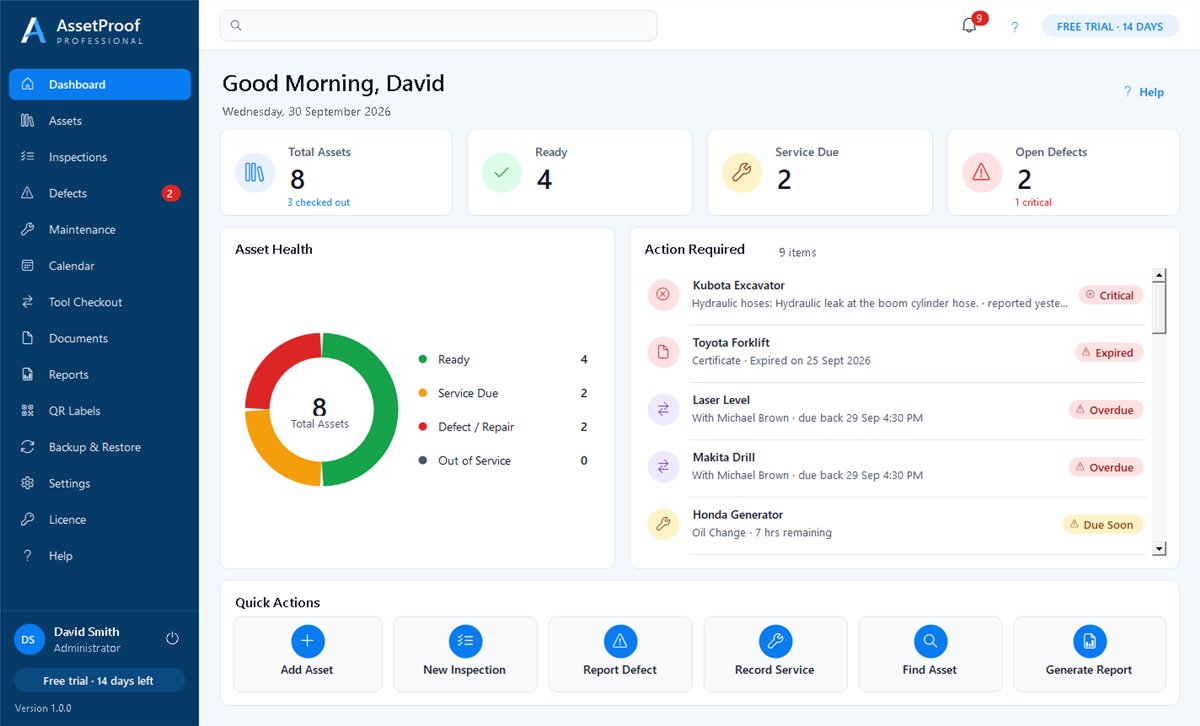
AssetProof dashboard showing total assets, ready, service due and open defects, an asset health chart, an action required list and quick actions

Features

Everything you need to look after your equipment

Built for Australian trades, landscapers, builders, fleets, councils and workshops that need to prove their equipment is inspected, maintained and accounted for.

Asset register

Vehicles, trailers, plant, power tools and equipment with photos, registration, VIN, serial numbers, readings and status.

Checklist inspections

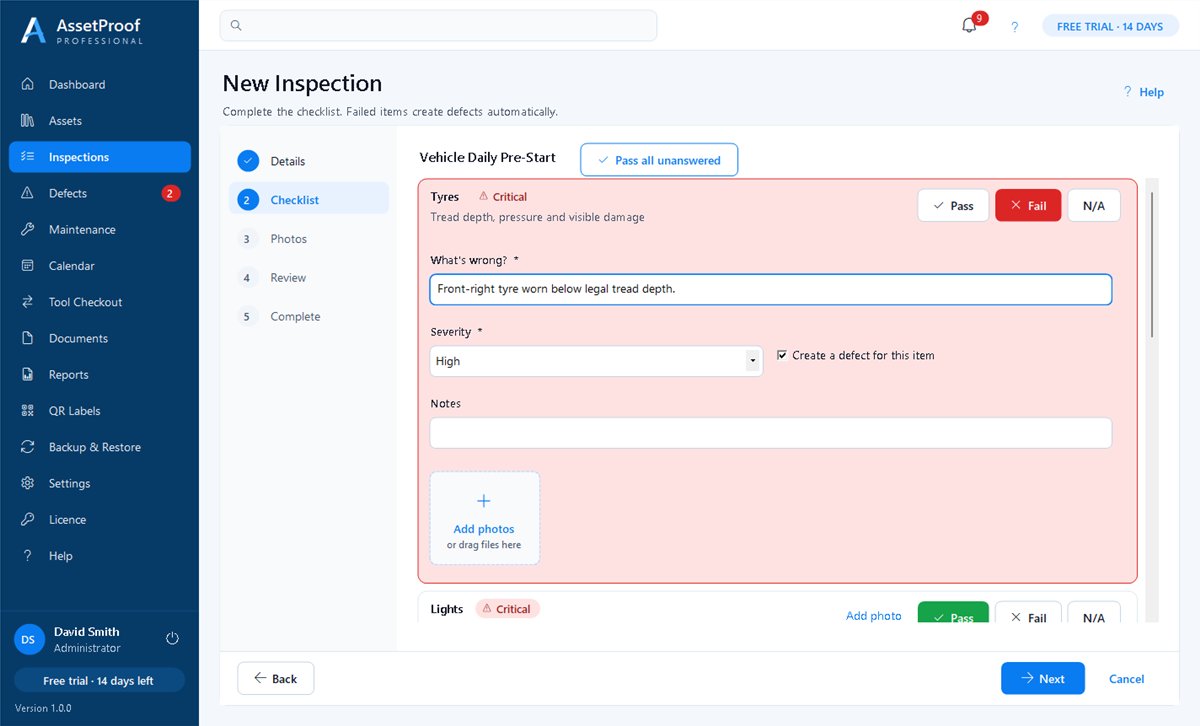
Pre-start and safety checklists with Pass / Fail / N/A and photos. A failed item creates a defect automatically.

Defects & repairs

Assign repairs, record costs and close defects once verified — every change kept in the history.

Maintenance & schedules

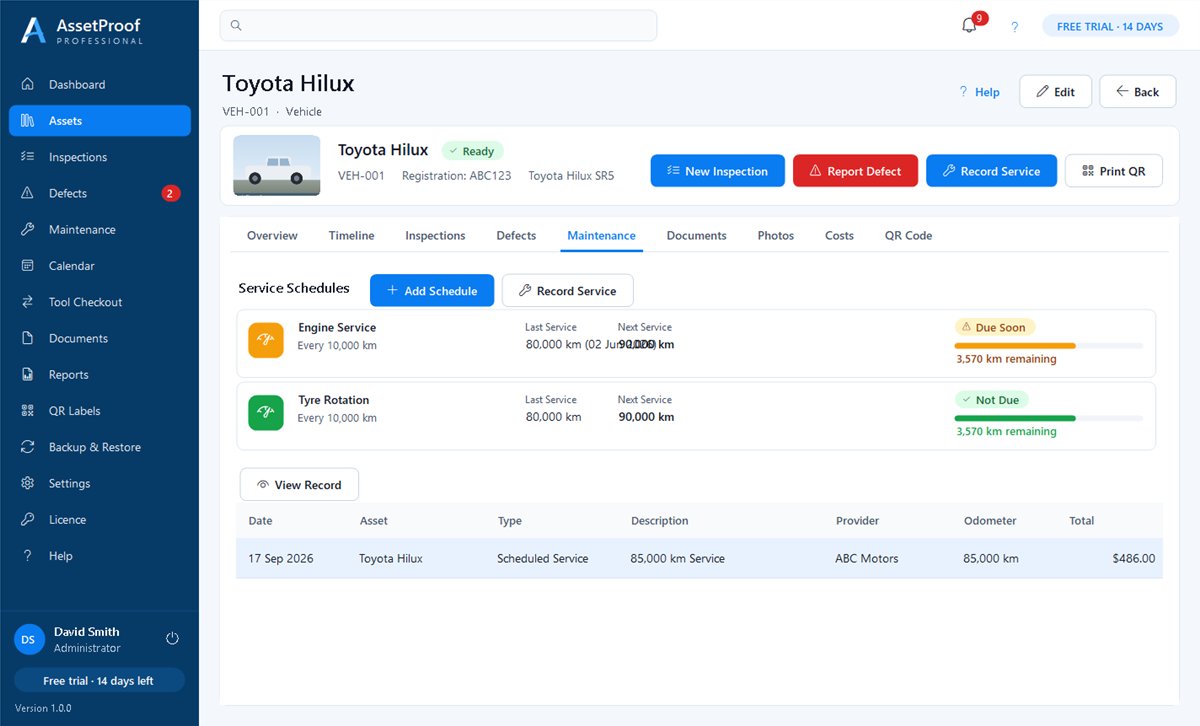
Record services with invoices and get reminders by date, kilometres or operating hours.

Documents & expiry alerts

Registration, insurance, warranties and certificates with alerts before they expire.

Tool checkout

See who has your equipment, when it's due back, and its condition going out and coming back.

QR labels

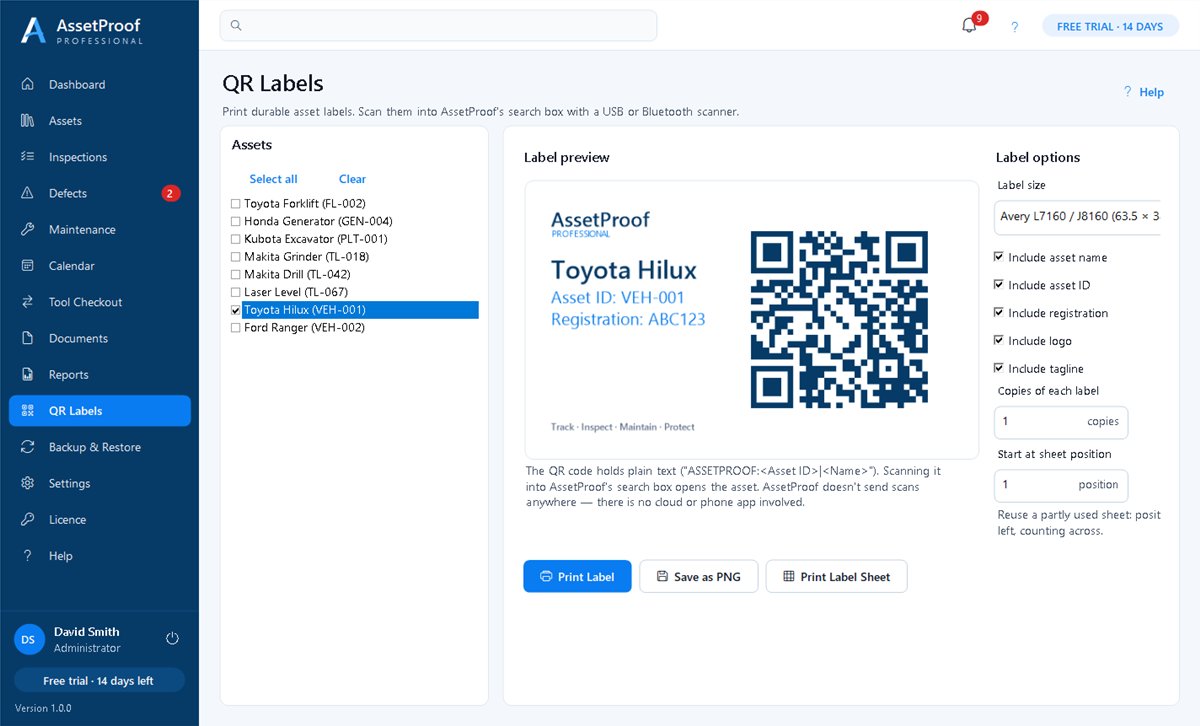
Print asset labels and scan them with a barcode scanner to open the asset instantly.

One complete timeline

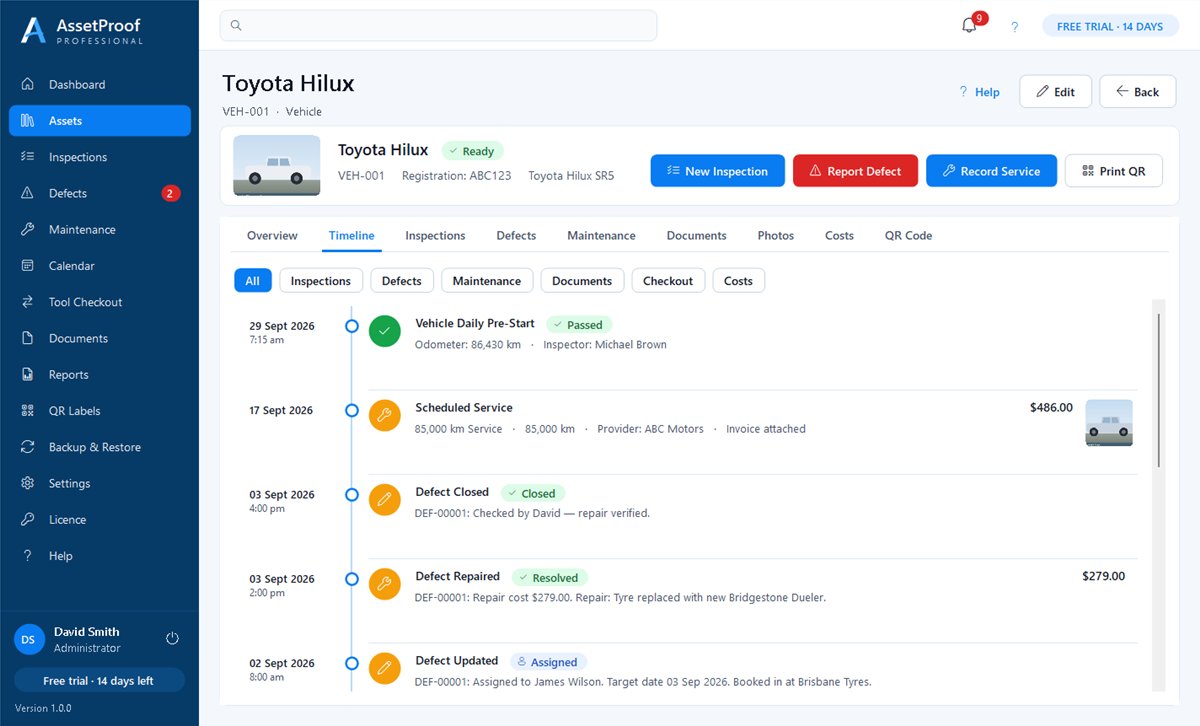
Every inspection, defect, repair, service, document and checkout for an asset, in date order.

Professional reports

Twelve branded reports — asset history, defects, maintenance, expiry, costs and audit — as PDF or CSV.

Screenshots
See AssetProof in action

Asset timeline for a Toyota Hilux listing inspections, a reported tyre defect, its repair and a scheduled service with costs
One complete history: inspections, defects, repairs and services in date order.
Inspection checklist with Pass, Fail and N/A buttons and a failed tyre item showing the problem, severity and photos
Fail an item and AssetProof raises a defect for you.
Service schedules showing last and next service with kilometres remaining
Service reminders by date, kilometres or operating hours.
QR label preview for Toyota Hilux with asset ID and registration, and label print options
Print QR labels on standard Avery sheets.

Screenshots of AssetProof 1.0.0 for Windows, shown with sample data and illustrative images.

How it works

Try it free, then activate in minutes

  1. Step 1: Download & install

    Download the installer below and run it. No account or payment needed.

  2. Step 2: Use it free for 14 days

    Every feature is unlocked during your trial. Your records are kept when it ends.

  3. Step 3: Buy a licence key

    When you're ready, click Buy AssetProof in the software or on this page. Your key appears instantly.

  4. Step 4: Activate

    Open Licence in AssetProof, enter your email and licence key, and click Activate. No reinstall needed.

Free trial

Download AssetProof

Install on Windows and use every feature free for 14 days. When the trial ends nothing is deleted — you can still view, report on and back up your records, and editing unlocks again as soon as you activate.

Download installer (56.0 MB)

Seeing a security warning?

New software from smaller publishers can trigger a warning from your browser, antivirus (such as McAfee) or Windows while it builds a download history. Our installer is safe, and you can check it matches the SHA-256 code below.

  1. Browser: open your downloads list and choose Keep or Download anyway.
  2. Antivirus: choose Allow or Accept for this file. Its icon appears once it's allowed.
  3. Windows: on "Windows protected your PC", click More info, then Run anyway.

Not sure? Email info@onebridgetechnologies.com.au and we'll help you install it.

Version
1.0.0
File
AssetProof-Setup-1.0.0.exe
Size
56.0 MB
Requires
Windows 10 or 11 (64-bit)
SHA-256
8916d3369df36a4ee21149dde89a9f53589d57b44ab3fd876b09509d9d76b2c6

New to AssetProof? Watch the free video tutorials: every task, step by step.

AssetProof Professional

$149 AUD

One-off payment · Australian dollars

  • Perpetual licence — no subscription
  • Activate on up to 2 computers
  • Licence key delivered instantly
  • Built-in Help Centre and email support
Buy licence key

Already purchased? Find my licence key

FAQ

Questions about AssetProof

AssetProof shows a friendly message with Buy and Enter Licence Key buttons. Your records are never deleted — you can still view them, create reports and backups, and editing unlocks again as soon as you activate.

Open AssetProof, choose Licence in the menu, type the email address you used to buy and your licence key (AP-PRO-…), then click Activate. An internet connection is needed once to activate.

Use Find my licence key with your purchase email and order number, or email info@onebridgetechnologies.com.au.

Yes — each licence key can be activated on up to 2 computers. Use Deactivate This Device when moving to a new computer, or contact us.

No. Your assets, inspections, photos and documents are stored on your computer. The internet is only used to activate your licence.

Phone cameras show the asset ID and name on the label. To open an asset in AssetProof, scan the label with a USB or Bluetooth barcode scanner into the search box.

Use Backup & Restore to create verified backups (or turn on automatic daily or weekly backups) and keep a copy on a USB drive or cloud folder.

AssetProof is made by One Bridge Technologies. Questions? Email info@onebridgetechnologies.com.au.